
If you run a Shopify store, you already know the pattern. The orders are pouring in, revenue is up, everyone's celebrating, then boom support inbox hits 400 unread tickets. Every business always hits the same wall: customers are asking where their order is, refund requests are backing up, and the instinct of every business owner is always the same: hire more people.
That instinct is the problem. Human support headcount scales in a straight line, more orders means more agents, more training, more scheduling, more management. But sales rarely grow in a straight line. They spike during holiday sales, a viral product moment, a holiday rush, ticket volume can jump 3-5x in a week, and no hiring pipeline moves that fast.
This is where AI employees come in, and it's important to be precise about what that term means here. An AI Employee is a task-performing agent, it can look up an order, check a refund policy, pull product data, execute a workflow, and only hand off to a human when a case genuinely needs one, this isn't the scripted chatbot you've dealt with on other sites that gets stuck the moment a question falls outside its decision tree.
In this guide, we will walk you through exactly how Shopify merchants are implementing AI employees to replace or dramatically reduce reliance on traditional support teams, step by step.
One common complaint we hear from Shopify store owners that we talked with is that customer support consumes too much of their time. Instead of focusing on growth, they spend hours resolving customer issues.
One store owner shared that she spends three hours every morning clearing the overnight ticket queue before she can even start her real work.
As a result, we looked for alternatives beyond chatbots. As we mentioned earlier, chatbots are linear and struggle with complex questions because they rely on scripted responses.
Here’s what we found instead was a better solution: AI employees for ecommerce.
A full-time support agent often ends up costing a Shopify store significantly more than just their base salary when you include training, software tools, management overhead, and employee turnover. In contrast, AI Employees operate on a fixed software cost that doesn’t increase with workload. Whether they handle 500 or 5,000 tickets per month, the cost remains largely the same, creating a completely different cost structure.
Customers shop 24/7, even when your team is offline. As a result, you may receive messages at 2 a.m. asking about a product or checking an order status, and customers expect immediate answers. For Shopify store owners, AI employees provide 24/7 support by responding to customer questions instantly, even after hours when your team is offline.
Tired support agents often give inconsistent answers. Policies get misquoted, and refunds are sometimes approved when they shouldn’t be, or denied when they actually qualify. This inconsistency erodes customer trust. AI Employees solve this by applying the same logic and policy rules every time. They reduce variability by consistently following your defined guidelines. Since their responses are based entirely on your business knowledge base, they ensure that every answer stays aligned with your policies and standards.
This is the core transformation. A store that goes from 1,000 to 10,000 orders a month doesn't need to 10x its support team if an AI Employee is handling the repetitive tier-1 volume. Your team can stay focused on the complex, high-value, relationship-driving conversations instead of getting stuck handling endless "where's my order” tickets.
To be useful, an AI Employee needs to do more than chat, it needs to execute real support tasks:
This is the difference between a chatbot and an AI Employee: the chatbot answers questions, an AI Employee completes tasks. Take Anna, Yep AI's customer support specialist, as an example.
Anna doesn't just respond to messages, she works the way a trained support hire would: checking order status directly against Shopify data, applying your actual refund policy instead of a generic script, and recognizing when a customer's tone signals she should hand the conversation off to a human rather than push through it herself.
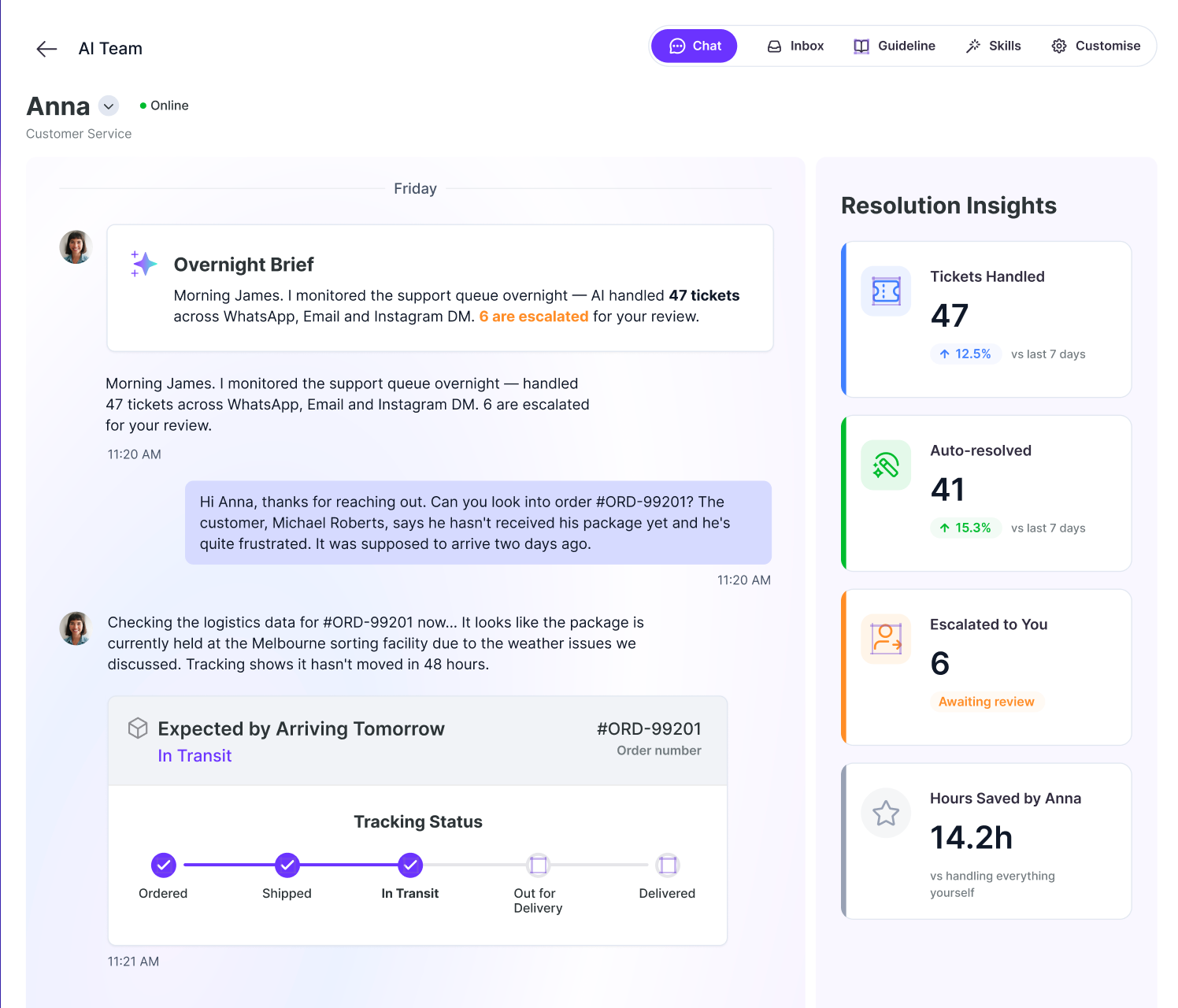
She's built to sit inside your existing helpdesk and knowledge base, so from the customer's side, it feels like they're talking to a member of your team, not a bot reading from a flowchart.
Now let's dive into how they do it:
Before you automate anything, you need a clear understanding of how your support system operates today.
Start by identifying your top 10 recurring customer queries. Pull this data from your helpdesk or inbox. In most Shopify stores, questions like “Where is my order?”, “How do I return this?”, and “Does this come in [size/color]?” account for a large portion of total ticket volume.
Next, map all your support channels from email, live chat, Instagram and Facebook DMs, and any helpdesk tools you use. These fragmented channels are often where automation creates the fastest and most noticeable impact.
Then, measure your average response time and resolution time per channel. This will serve as your baseline for tracking improvements and proving ROI later.
Finally, identify bottlenecks and high-effort tasks, queries that take the longest to resolve or require switching between multiple systems like order data, inventory, and shipping carriers. This audit isn't optional groundwork, it's the data set that tells you exactly what to automate first.
Once you understand your support landscape, the next step is deciding what should actually be automated first. Not everything should be automated on day one. A key principle in customer support automation is knowing how to decide which support tickets to automate first, and this should be based on prioritization grounded in risk and impact.
Start by prioritizing high-volume, low-risk tickets that follow predictable patterns. These are usually simple requests like order status checks, basic product questions, or standard return instructions. They’re ideal for early automation because they reduce workload without introducing operational risk.
From there, gradually evaluate more complex workflows based on their business impact and sensitivity. The goal is to automate what is repetitive and safe first, while keeping high-risk or emotionally sensitive cases under human handling until your system is fully mature.
This is where the technical build begins.
Connect the AI to your Shopify store data, orders, inventory, and product catalog—so it can respond with real-time, accurate information instead of generic scripted replies.
Next, integrate it with your existing helpdesk tools such as Yep AI, Gorgias, Zendesk, and other similar platforms. This ensures tickets, conversation history, and customer context stay centralized instead of fragmented across multiple systems.
Then define your knowledge base sources, including your return policy, shipping policy, size guides, and product FAQs. This creates a single source of truth that the AI Employee can consistently reference.
Finally, configure tone and brand voice. An AI Employee for a playful DTC skincare brand should not sound like one built for a B2B industrial supplier. This step ensures automated responses feel like your brand, not a generic chatbot.
The real power of an AI Employee is in the logic behind the conversation, not the conversation itself. Build actual decision workflows:
This workflow-first approach is what separates a functioning AI Employee from a chatbot that just answers the literal question asked.
Before the AI interacts with real customers, it must be thoroughly stress-tested. Run simulation conversations that cover your most common query types, along with edge cases and unusually phrased questions.
Deliberately test failure points such as ambiguous requests, messages with multiple issues, angry customer tone, and non-English inputs where relevant.
Make sure to refine responses using real historical customer conversations instead of hypothetical scenarios. This ensures the AI reflects how your customers actually communicate and what they truly need.
Finally, evaluate brand tone consistency across all response types. A refund denial should sound just as on-brand and controlled as a friendly product recommendation.
Avoid switching everything on at once. Do not move 100% of tickets to AI on day one.
Start with 20-30% of total ticket volume, focusing on the simplest and most repetitive Tier 1 inquiries identified during your audit. Closely monitor CSAT and resolution accuracy during this phase. This is where issues are identified before they scale.
As days passes, gradually increase the AI workload as performance metrics remain stable or improve over time. At the same time, keep human agents in a supervisory role at the beginning, reviewing flagged conversations, handling edge cases, and continuously refining workflows.
Automation is not a set it and forget it system. It requires continuous monitoring and improvement. Track key metrics such as:
Regular optimization ensures the system improves over time instead of stagnating.
Even with the right framework, merchants run into the same handful of pitfalls when rolling out AI Employees. Knowing them ahead of time saves you from learning them the hard way.
AI Employees aren't a replacement gimmick or a short-term cost-cutting trick, they're becoming core infrastructure for how Shopify stores operate. The merchants winning right now aren't the ones who fired their entire support team overnight. They're the ones running a hybrid model: an AI employee handling the repetitive, high-volume tier-1 work, and human agents focused on the complex, high-value conversations that actually need a person.
This is exactly the roleYep AI customer support specialist Anna is built to fill. Instead of replacing your team, she absorbs the repetitive volume, order lookups, refund checks, FAQ deflection, so your human agents can spend their time where it actually matters: retention, VIP relationships, and the edge cases that build long-term customer loyalty.
This hybrid approach is quickly becoming the standard for serious Shopify merchants, not a future trend. The stores building this system now, rather than waiting until support costs become unmanageable, are the ones gaining a real competitive advantage.
The tools for Shopify customer support automation are mature enough today that the question isn't whether to adopt them, it's how fast you can get the workflow right.
Ready to see Anna in action? Register now and start your 14-day free trial, no developer required, no card required at signup.
With Yep AI, you can think less, stress less, and let AI Employees handle the rest.